Terrain painting
The Blend tool (Shift+G) paints a terrain's layers. Like Sculpt, it works on the selected terrains, or on all of them when nothing is selected.

The Blend tool
Pick a mode, a falloff, the layer (0 to 3), the radius and a strength in the tool options bar. Several light passes give softer edges than one strong pass.
| Mode | Paints |
|---|---|
| paint | Towards the layer |
| erase | Back towards layer 0 |
| smooth | Softens borders |
| sharpen | Lets the strongest layer win |
| noise | Only in cloud shaped patches of the given size, for moss, dry grass or gravel |
| slope | Only where the ground is between two angles. 30 to 90 puts rock on anything steeper than 30° |
| height | Only between two world heights, for sand at a waterline or snow above a tree line |
The slope and height masks make huge brushes safe, a hill sized brush in slope mode only turns the cliffs to rock. The masks fade over 4° or up to 64 units, so their edges blend.
| Falloff | Shape |
|---|---|
| smooth | Gentle fade |
| linear | Even fade |
| constant | Whole disc at the same strength |
| spray | Random speckles, for pebbles and flowers |
Shift turns paint, noise, slope and height into erase, and Ctrl smooths. Ctrl+wheel resizes the brush.
Auto Paint
Terrain > Blend > Auto Paint Layers repaints the selected terrains from their shape:
| Layer | Goes on |
|---|---|
| 1 | Slopes steeper than about 50° |
| 2 | The top 20% of the height range |
| 3 | The bottom 8% of the height range |
The range starts at the lowest point, which on an island is the sea floor. Tick Bands from sea level to measure from a height you give instead. Auto Paint replaces all paint, so run it before painting by hand.
How narrow you can paint
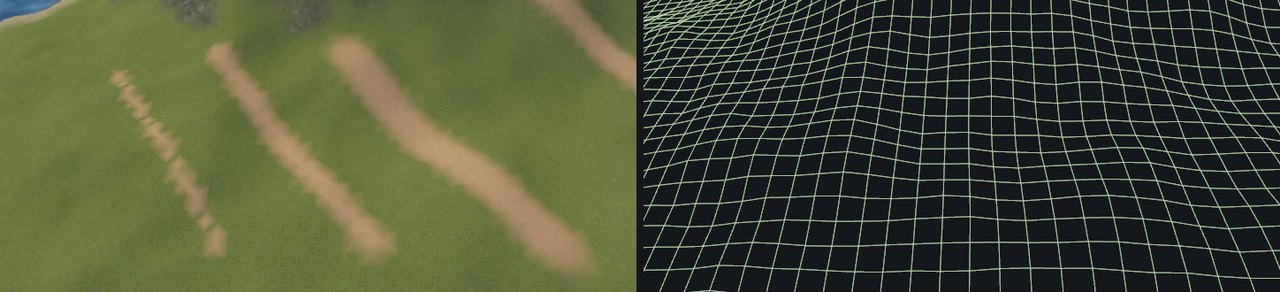
Paint lives on the vertices, so what counts is the brush radius relative to the cell size.
| Radius | Result |
|---|---|
| Below one cell | A staircase |
| About 1.5 cells | Continuous, ragged edges |
| 2 cells or more | A clean band |
For a narrow track, use smaller cells, or lay a mesh or decal on top. Terrain paint suits ground cover seen from afar.
A working order
- Sculpt first, paint afterwards. Auto Paint and the slope and height masks read the shape as it is when you paint.
- Put rock on with Auto Paint or a slope brush, the shoreline with a height brush, paths by hand.
- Soften borders with a light smooth pass, then break them up with noise or spray.
- Keep one layer free for ground that follows no rule, such as paths.