Importing Hammer and TrenchBroom maps
Got a level from Hammer or TrenchBroom? Bring it over instead of rebuilding it. File > Import opens a Hammer .vmf,
or a TrenchBroom, Quake or Qodot .map, as a new unsaved map (in a new tab if the open map has unsaved changes).
Save it as .tdm and Godot builds it like any other map.
Steps
-
Open the Godot project first
Open the project the map is for with Godot > Open Godot Project…, since converted textures go into its texture folder.
-
Import the map
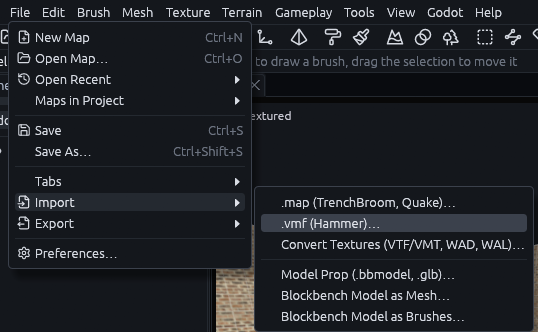
Go to File > Import and pick .vmf (Hammer)… or .map (TrenchBroom, Quake)…, then the file.
-
Convert the textures
When textures for the map sit near it, the editor asks "Convert the map's textures?" for the ones the project lacks. Say yes, see Converting textures.
-
Check the Issues tab
Open the Issues tab at the top left, next to Outliner and History. Every material the project still lacks shows up as a warning, and its faces draw as a checker.
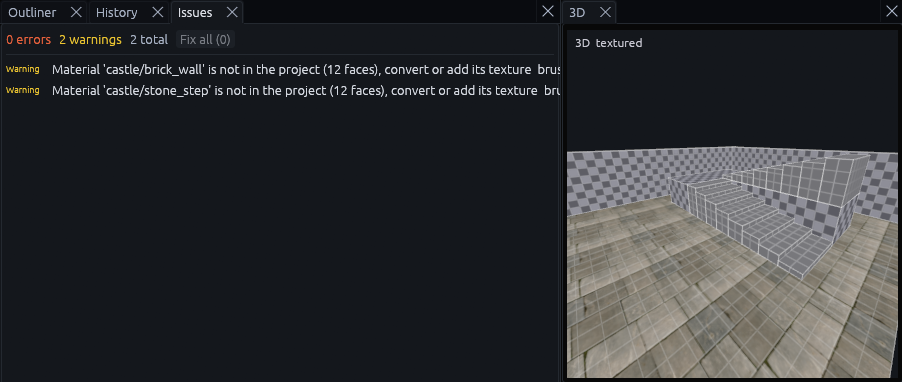
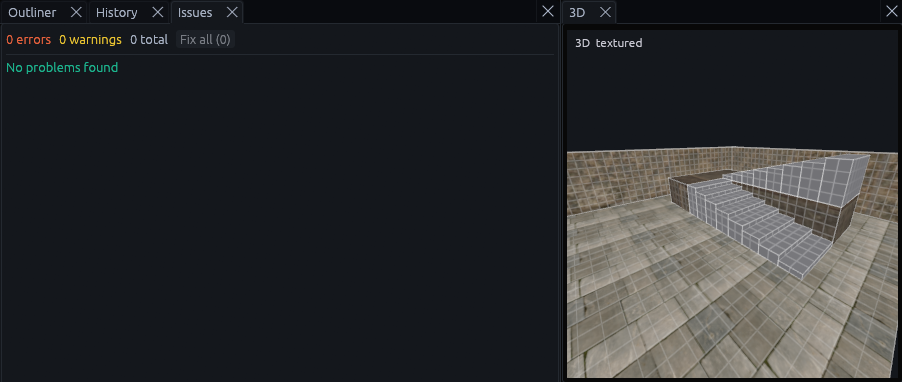
The faces keep the material name, so adding the texture later fixes them. Once every texture is there, those warnings are gone.
-
Save it
Use File > Save As… and save it as a
.tdminside the project.
Note
Units are kept as they are. Source maps are built for about 40 units per meter and Quake maps for about 32, so a Source map comes out a little larger than in its game unless the project uses a different scale.
What the import keeps
| Hammer | In TrenchDot |
|---|---|
Tool materials (tools/toolsnodraw, toolsclip, toolsplayerclip, toolstrigger, toolsorigin, ...) |
The project's skip, clip and origin textures and special/trigger |
| Sky faces | The project's sky texture, special/sky by default |
| Displacements | Displacements with their heights and blend alphas |
func_instance |
A group holding the instance's contents, moved into place. Names inside get the instance's fixup, its $ and # replacements are filled in, and outputs aimed at instance:name;Input are wired to the real entity |
| Visgroups | Layers |
| Hidden objects | Hidden nodes |
| Entity keys and outputs | Entity properties and outputs |
TrenchBroom layers and groups stay layers and groups, and Quake tool textures become the project's tool textures the same way.
Only need a few brushes? Copy them in TrenchBroom and press Ctrl+V in TrenchDot, they come over converted the same way, see Prefab library.
Sky faces collide in Godot but draw nothing. The worldspawn key sky_source keeps the texture they had, and converting
the textures turns it into a procedural sky, see Converting textures.
Known limitations
| Limitation | What to do |
|---|---|
Textures inside .vpk or .pak archives are not read |
Extract them first, for example with VPKEdit |
| Instances are looked for next to the map and in the folders above it | Keep the game's maps folder layout. Instances that are not found stay func_instance entities |
| Valve and Quake entity classes have no definitions in a new project, so the editor does not know their keys | Add them to your FGD, or replace them with your own classes. The Issues tab lists them |
Some Source material features are left out: $basetexture2 blends, detail textures, env maps and proxies |
Set them up in Godot |
| Quake 3 patches (curved surfaces) and brush primitives are skipped. The status bar says how many | Rebuild them as meshes |
| Displacements whose vertices move sideways, not only up and down, become meshes with no blend alphas | Edit them as meshes |