Scripted cutscene
The player walks into a room, a sign pops up, a guide walks off, a barrel explodes, a lamp comes on and the exit
opens. None of it needs code of its own: a timer entity fires one output per beat, and each output is wired to the
entity that should act. You find it as the scripted_scene map in the demo project.
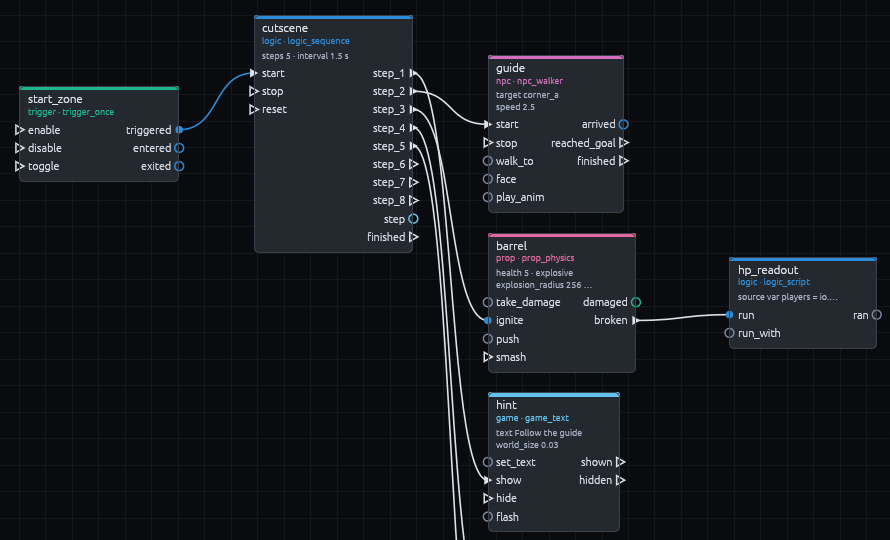
The timeline
Every entity here comes with the Gameplay entities pack. Install it first if your project does not have it yet, with Gameplay > Install Gameplay Entities.
-
Cover the entrance
Draw a brush over the entrance and make it a
trigger_oncenamedstart_zone(right click, Create Brush Entity > trigger_once). It firestriggeredthe first time the player walks in, then switches itself off, so the scene only plays once. -
Add the timeline
Pick
logic_sequencefrom Gameplay > Logic, it lands at the 3D cursor. Name itcutscene, setstepsto 5 andintervalto 1.5. Once started it firesstep_1,step_2and so on, 1.5 seconds apart.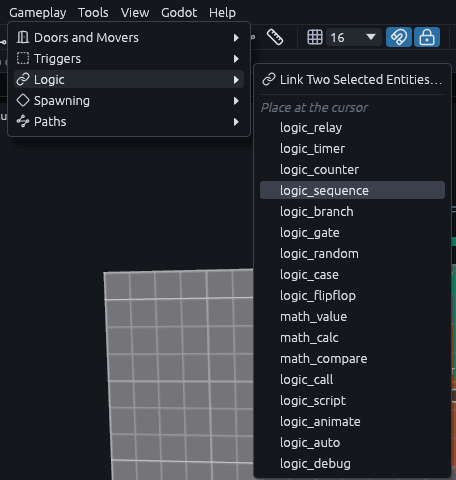
-
Start it from the trigger
Link
start_zone'striggeredoutput tocutscene.start, with Gameplay > Logic > Link Two Selected Entities… like in Button opens a door. -
Wire each beat
Link each step output of
cutsceneto the entity that acts in that beat, one pair at a time. Dragging from an output pin to an input pin in the Logic panel works too.
| Output | Target and input | What happens |
|---|---|---|
step_1 |
hint.show |
A game_text reads "Follow the guide" |
step_2 |
guide.start |
An npc_walker sets off along its path_corner chain, a row of markers each naming the next |
step_3 |
barrel.ignite |
An explosive prop_physics burns its fuse, then blasts and breaks |
step_4 |
lamp.turn_on |
The lamp switches on |
step_5 |
exit_door.open |
The exit door slides up |
Select cutscene and you should see all five under Outputs in its Inspector.
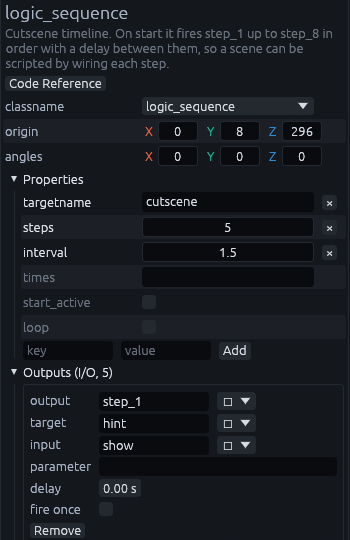
The sequence waits before every step, the first one too, so step 1 fires at 1.5 s and step 5 at 7.5 s. For uneven
timing, set times to one wait per step, like 0.5 2 1 1 3.
Reading the player's health
Some reactions need a little logic that no built in input covers. A logic_script runs a short GDScript snippet when
it is fired. Link the barrel's broken output to hp_readout.run, a logic_script whose source writes the
player's health onto a HUD game_text named hpmsg:
var players = io.find_targets(this, "!player", null)
if players.is_empty():
    return
var hp = int(players[0].health)
for label in io.find_targets(this, "hpmsg", null):
    label.set_text("HP " + str(hp))
    label.show()
Use !player here, not !activator. !activator is whoever set the chain off, and the step outputs and broken
carry nobody. !player always finds the node in the player group. broken fires after the blast has done its
damage, so the health is already up to date.
Playing it
The scene script,
godot/demo/scenes/scripted_scene.gd,
only builds the map, spawns the player at the info_player_start and adds a TrenchDotDebugOverlay. Press F3
in game to watch each output fire. It is the quickest way to spot a step that is wired to the wrong name.
MCP
The demo map is built by driving the editor through the MCP server. The calls are in examples/mcp/scripted_scene.json.