Debugging wiring
Most wiring mistakes fail quietly: the door just stays shut. Check in this order, from the quickest check to the most thorough.
Tip
A door or trigger that does not even block the player was built without its definition, which is not a wiring mistake. See Entities that do nothing.
1. The Issues panel
Open the Issues tab, next to Outliner and History on the left. It flags outputs aimed at a targetname no entity has, and inputs the target's class does not have. A typo in a targetname is the most common reason a door stays shut.

Click an issue to select its entity and frame it in the views, then correct the name in the Inspector.
Warning
Fix on a missing target does not guess the right name, it deletes the connection. For a typo, fix the name by hand instead.
2. The Logic graph
In the Logic graph a target nobody has shows up as a red node with a dashed red wire, saying no entity has this name.
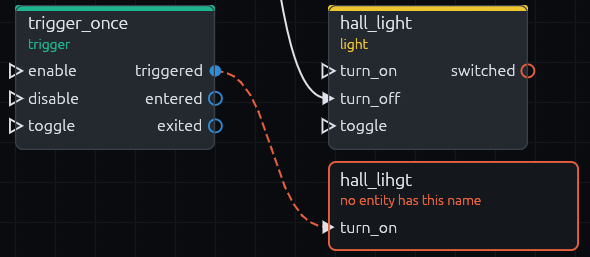
Simulate fires an output on paper and highlights the whole chain, see Simulate.
3. F3 in game
Add a TrenchDotDebugOverlay node to your scene in Godot, or add it as an autoload. Run the game and press F3: it
lists outputs as they fire and draws every Area3D volume with its targetname, so you see whether a trigger never
fired or fired at nothing.
Toggle it again after spawning triggers, volumes are collected when it turns on. The key is the overlay's toggle_key
property.
4. Logging
Place a logic_debug entity and tick its trace_all box in the Inspector. Every output that fires is then printed to
the Godot output.
From code, connect to TrenchDotIO.events().fired, which is emitted for every output, including ones whose target
resolved to nothing.
TrenchDotIO.events().fired.connect(func(source, output, target, input, parameter):
    print(source.name, ".", output, " -> ", target, ".", input))
What each mistake looks like
| Mistake | Symptom | Fix |
|---|---|---|
| Target resolves to nothing | [TD I/O] <node>.<output>: target '<name>' matches no node the first time it fires |
Make the target match the entity's targetname exactly, case included |
| Target has no such input | [TD I/O] <node> has no input '<name>' in the Godot output |
Pick an input the target's class has, see the Entity reference |
| Output the entity never emits | [TD I/O] <node> has no signal '<output>' once, when the map is built |
Pick an output the class has, or fire it from code with TrenchDotIO.fire_output() |
| Entity spawned or renamed at runtime | Not found by its targetname | Call TrenchDotIO.invalidate(), see Runtime changes |