Materials
Every face points at a material by its path inside the map settings' Base Texture Dir, without the extension, for
example showcase/planks.
When Godot builds the map it looks for showcase/planks.tres in that folder, or in Base Material Dir instead if you
set one, and uses it as it is. No .tres? Then the addon makes a plain material from the image. TrenchDot previews
the same .tres, so both sides look alike.
You only need a .tres when a plain image is not enough, for example to change the scale, add glow or make it see
through. A .tres with just an albedo_color and no texture works too, the editor draws it in that color.
New textures and materials show up in the Materials tab within a couple of seconds, no reload needed.
Texture size
By default one texture pixel covers one map unit, so a 64 pixel texture repeats every two meters. Great for pixel art, but a 1024 pixel photo of a two meter wall would stretch over 32 meters.
To fix that, tell the material how many map units one repeat covers:
[resource]
albedo_texture = ExtResource("1_albedo")
metadata/texture_size = Vector2(64, 64)
(You can also add it in Godot's inspector under Metadata, as a Vector2 or a single number.)
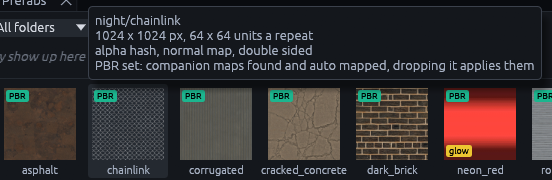
Hover the material in the Materials tab to check it, the tooltip shows the image size and how many units one repeat covers.
Now you can swap in a sharper image without changing the map. Terrain layers ignore it, their tile setting already
sets the repeat.
Glowing materials
A material glows when its file sets emission_enabled. With a black emission color, the emission texture glows exactly
as painted:
[resource]
albedo_texture = ExtResource("1_albedo")
emission_enabled = true
emission = Color(0, 0, 0, 1)
emission_energy_multiplier = 2.5
emission_texture = ExtResource("2_emission")
No material file? Put an image named like the albedo with _emission added next to it, night/sign_emission.png next
to night/sign.png, and it becomes the glow map.
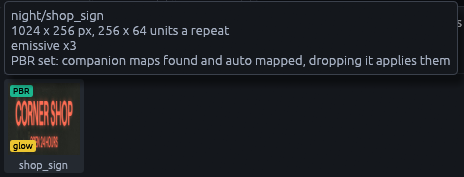
Glowing materials get a yellow glow tag in the Materials tab:

Press F3 for Lit Preview to see them glow in the 3D view. The bloom around them only shows in Godot, see Night lighting.
Transparency
Set transparency in the material file when the texture's alpha channel should let things show through. Each mode
trades quality for cost differently:
transparency |
How it works | Use it for | Watch out |
|---|---|---|---|
1 blend |
Mixes the surface with what is behind it | Glass, soft stains, smoke | Casts no shadows |
2 scissor |
Pixels are either fully shown or cut away | Hard cutouts up close, like grates and leaves | Thin parts vanish at a distance |
3 hash |
Dithers pixels, the lower the alpha the fewer are shown | Thin cutouts seen from afar, like wire fences | Soft edges turn into static |
The tooltip in the Materials tab tells you which mode a material uses: