C# entities
A C# class can be a placeable entity without a .tres definition. The addon reads your source files: signals become
outputs, exported members become keys and marked methods become inputs.
Running C# entities needs the .NET build of Godot. The editor lists them either way, but Godot can only build one
when it runs the .NET build, the C# project is built and the class has [GlobalClass]. Otherwise a C# brush entity
builds as a plain Node3D without collision and a point entity as an empty one, and Godot's Output panel says
Node Class ... not found with these three things to check.
1. Add the helper
Open the Reference panel (View > Panels > Reference) and press Add C# helper to project at its top left.
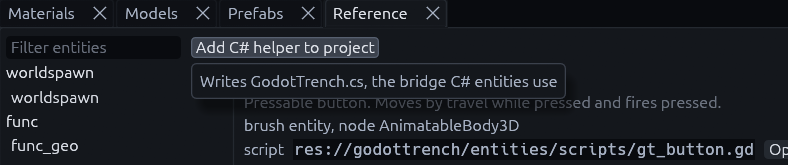
It writes res://addons/func_godot/csharp/TrenchDot.cs, which holds the attributes. Without it your entity code
does not compile.
2. Declare an entity
[GlobalClass]
[TrenchDotEntity("npc_guard", Description = "Patrolling guard",
    Color = "#ff4040ff", Size = "-16 0 -16 16 64 16")]
public partial class NpcGuard : CharacterBody3D
{
    [Signal] public delegate void AlertedEventHandler(Node activator, int level); // output "alerted"
    [Export] public float WalkSpeed { get; set; } = 3.5f;                          // key "walk_speed"
    [TrenchDotInput] public void Alert(Node activator) { }                        // input "alert"
}
| Part | Why it matters |
|---|---|
[GlobalClass] |
Required, the map build creates the node by its class name |
Size |
The box the editor draws for the entity, as mins then maxs in map units |
Solid = true |
Makes a brush entity, like a door, instead of a point entity |
[TrenchDotInput] |
Marks inputs. If no method has it, every public void method with a capitalized name is an input |
Names are snake_case in the map and PascalCase in C#. To read keys yourself, implement
_func_godot_apply_properties(Dictionary props) and use the helper's readers like
TrenchDot.Float(props, "walk_speed", 3.5f).
Tip
The Reference panel's C# class tab writes a skeleton with the signals, exports and inputs of any entity,
a quick start for your own. It leaves out the [TrenchDotEntity] line, add that yourself.
Where the addon looks
The editor and the map build each scan folders for C# entity classes, set in two places:
| Used by | Setting |
|---|---|
| The editor (game config export) | Csharp Source Dirs on the game config resource |
| The map build | Project setting trenchdot/csharp_entity_dirs |
Both default to res:// and skip addons, bin, obj and hidden folders.
Note
A C# class cannot replace a library entity. If the FGD already defines its classname, the FGD wins.
I/O from C
var guide = TrenchDot.FindTargets(this, "guide")[0];
guide.Connect("finished", Callable.From(() => GD.Print("cutscene over")));

foreach (Node barrel in TrenchDot.FindTargets(this, "barrel"))
    TrenchDot.Invoke(barrel, "ignite", "", this);

TrenchDot.FireOutput(this, "alerted", player);
The Reference panel's Use from C# tab generates this code for any entity.
MCP
An agent or script driving the editor over the MCP server gets the same generated code from the
code_reference tool.