Reviewing changes
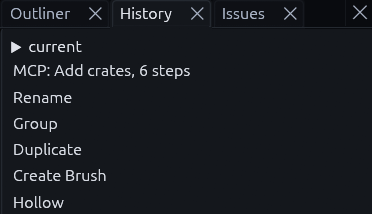
Keep your maps in git and you can see what changed between two versions, the same way you review code. For changes inside the current session, the History panel lists every edit and undoes back to any of them.
Maps in git
.tdm files are binary, but git can still show you readable diffs. It asks the editor to print each version as JSON
and compares those. You set this up once:
-
Add this line to
.gitattributesin your project:*.tdm binary diff=tdm -
Tell git how to print a map, once per clone:
git config diff.tdm.textconv "trenchdot --dump" -
(Optionally) keep backups and autosaves out of the repository with these lines in
.gitignore:*.tdm.bak *.tdm.autosave
git diff and git log -p should now show map changes as JSON, instead of only saying that the binary files differ.
Warning
trenchdot has to be on your PATH, or git diff fails on maps.
To get that JSON as a file, trenchdot --to-json map.tdm map.json writes it, and trenchdot --to-gtm map.json
map.tdm turns it back into a binary map. See Command line.
MCP
The MCP review tools show you what an AI agent did to your map.
Edits made by an AI agent
When an agent edits your map over MCP, every tool call is one undo step named MCP: ... in the
History panel. A whole run_script is one step too, such as MCP: Add crates, 6 steps.
Undo that step to take the agent's work back.
| To see | Ask the agent for |
|---|---|
| What changed since you last saved | changes_since, which lists nodes added, removed, moved or otherwise edited |
| What its last call or script changed | changes_since with undo_steps: 1 |
| What changed since a git commit | changes_since with file set to that version, written with git show HEAD:maps/level.tdm > old.tdm |
Tip
Ask the agent to put a multi-step job in one run_script with a label, so the whole job undoes in one
step under a name you recognize.