Collision
Every Gameplay pack brush entity and every model entity collides without you setting anything. Doors, buttons,
lifts, trains and triggers get a convex hull per brush, and prop_model, prop_physics, npc_walker and scatter
props get a shape built from their model. You only touch the keys below when the default does not fit.
The keys
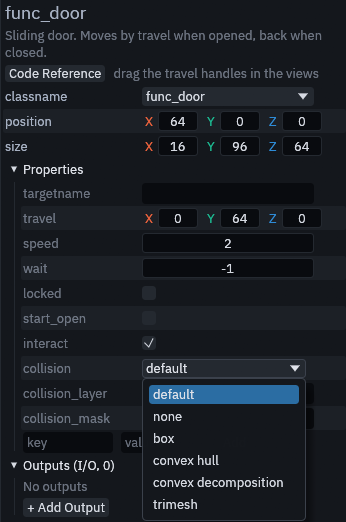
Select the entity and find these rows in the Inspector. Hover a row to read what each choice does.
| Key | Default | What it does |
|---|---|---|
collision |
default | The shape: default, none, box, convex hull, convex decomposition or trimesh |
collision_layer |
empty | The physics layers the body is on, as layer numbers such as 1, 3. none puts it on no layer |
collision_mask |
empty | The physics layers the body detects, in the same form. none detects nothing |
An empty layer or mask keeps the default: the entity definition's layer and mask for brush entities, with triggers taking Trigger Collision Mask from the map settings, and the project settings below for model entities.
Picking a shape
| Shape | Brush entities | Models |
|---|---|---|
| default | The class shape, a convex hull per brush | The project setting, a convex hull per mesh unless changed. prop_physics uses a box from size |
| none | No collision | No collision |
| box | One box around all brushes | One box around the model, the cheapest shape |
| convex hull | A hull per brush | A hull per mesh, fine for boxy models |
| convex decomposition | Same as convex hull, a brush is convex already | Several hulls that follow a concave model like an arch, slower to build |
| trimesh | Every face, for static bodies only | Every triangle, exact but the most expensive |
Trimesh only works on static bodies. Doors, buttons, lifts and trains are animatable bodies, which count as static, so
they can use it. Triggers, prop_physics and npc_walker build convex hulls instead, and a trigger set to trimesh
reports a warning when the map builds.
A prop_model whose model already holds a collision body keeps that body and builds no shape of its own.
Project defaults
Model entities whose keys are empty follow three settings in Godot's Project Settings, under Trenchdot > Collision. They appear once the TrenchDot plugin is enabled.
| Setting | Default | What it does |
|---|---|---|
| Model Shape | convex | The shape default stands for on prop_model and npc_walker |
| Model Layer | 1 | The layer model bodies are on |
| Model Mask | 1 | The layers model bodies detect |
Scatter sets pick their shape in the scatter set's own Collision row, see Scatter.
Your own brush entities
A brush entity you define yourself collides as the body its Node Class names. With Node Class left empty it takes
the body its script extends, and with no script, or a script extending Node3D, it becomes a StaticBody3D. Only a
script extending some other node, such as a Marker3D, leaves it without collision, and the build warns about it. See
Custom entities in GDScript.
The editor viewport does not draw collision shapes. Godot's Debug > Visible Collision Shapes shows them while the
game runs, in the live session and in a full build alike. Brush entities and prop_model save their shapes in the
built scene, prop_physics and npc_walker build theirs each time the scene loads, the way they load their model.
A prop_model or npc_walker whose model scene already holds a physics body keeps that body and builds no
shapes of its own.